How to configure global settings for automatic password distribution and overdue freezing rules for smart locks?
Use [Personal Center] -> [IoT Settings] -> [Smart Lock] to manage the default sending and freezing rules for smart locks.
Entry:
- [Personal Center] -> [IoT Settings]
Web
Step 1 Open [IoT Settings] from [Personal Center].
- The current page contains both a [Smart Lock] card and a [Smart Meter] card.
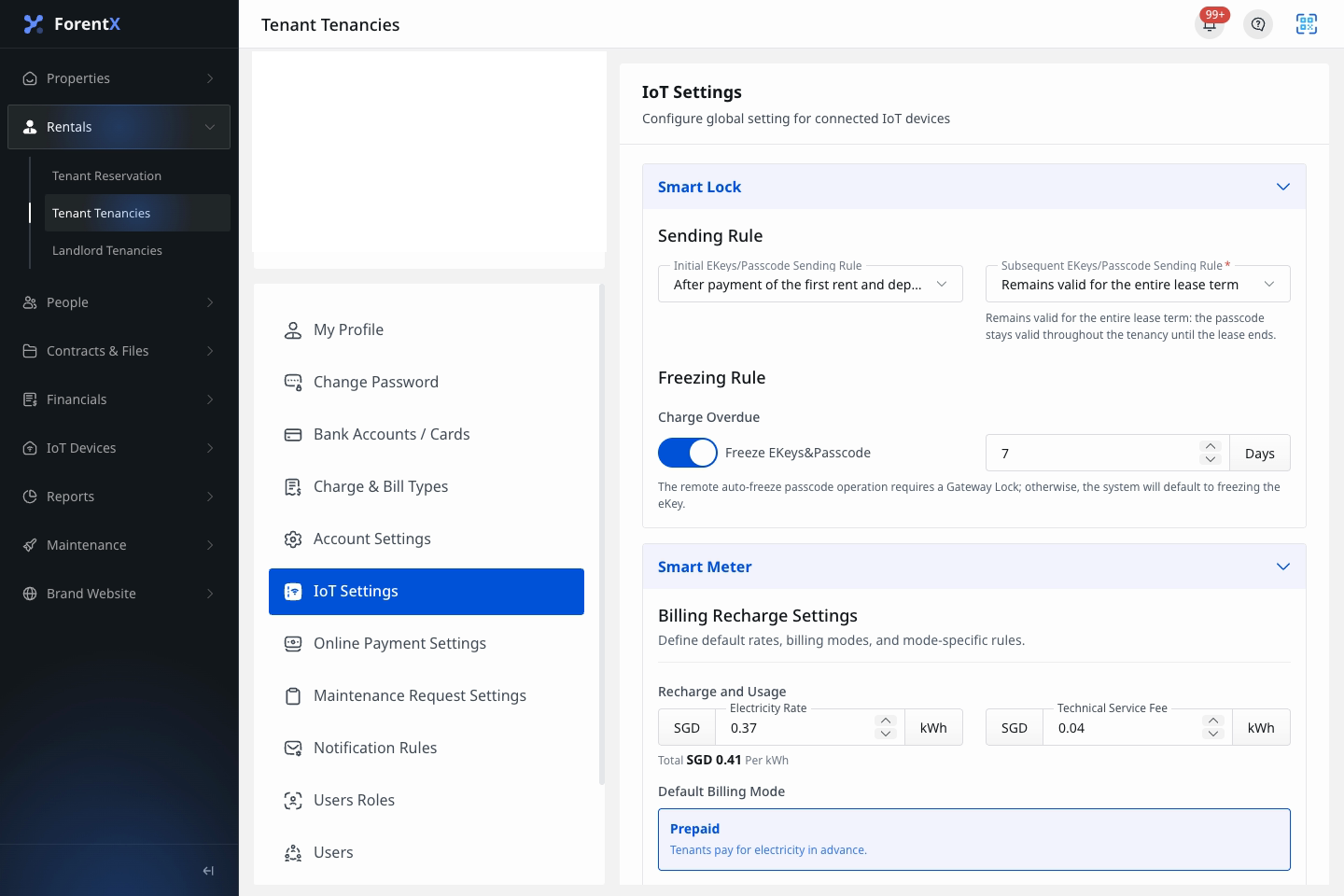
Step 2 Review the current sending rules in the [Smart Lock] card.
- [Initial EKeys/Passcode Sending Rule] controls when the first smart lock credential is sent.
- [Subsequent EKeys/Passcode Sending Rule] controls how follow-up credentials stay valid after the initial rule has started.
Step 3 Review the current freezing rule in the same card.
- [Charge Overdue] lets you decide whether overdue charges freeze the current [EKeys/Passcode].
- When the freeze switch is on, you must also set the overdue grace period in days.
Step 4 Change the rule values you need directly on the page.
- The current page uses inline controls, including dropdowns, a switch, and a day input.
Note:
- This page manages the operator-wide default rules for smart locks.
- The current Web flow saves changes automatically after a valid change is made.
- If you turn on overdue freezing, the grace period must be at least
1day.