How should I unbind a smart meter if I no longer use it?
Use [Unlink Property] on the smart meter detail page when you want to remove the current property or unit association but keep the smart meter record.
Entry:
- [IoT Devices] -> [Smart Meters]
Web
Step 1 Open the detail page for the linked smart meter you no longer want to keep attached to the current property or unit.
Step 2 Click [Unlink Property].
Step 3 Review the current warning before you confirm.
- The page warns that you need to handle unsettled electricity bills yourself.
- The page warns that you need to handle any prepaid balance yourself.
- The page warns that you need to handle historical electricity usage records yourself.
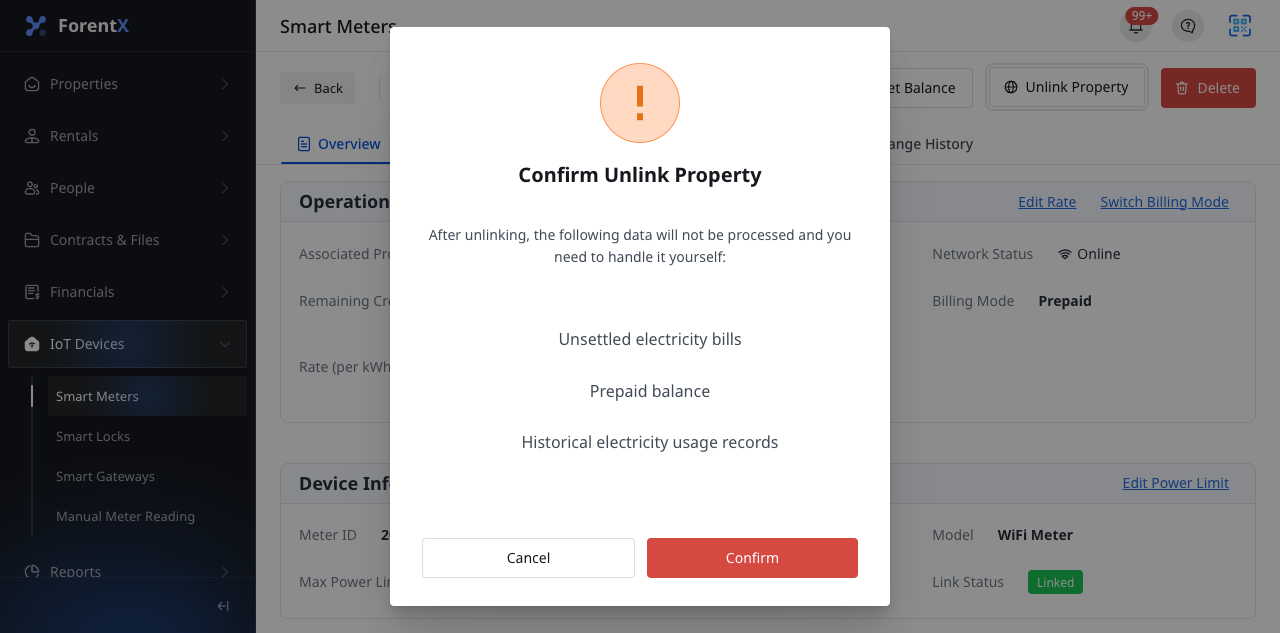
Step 4 Click [Confirm] if you still want to continue.
Note:
- [Unlink Property] appears only for linked smart meters.
- Unlinking is different from deleting the smart meter. Use [Delete] only when you want to remove the smart meter from current operator control.