What notification will a new tenant receive after a reservation is created?
In the reservation flow, use [Send Welcome Email] on the [Tenant] step to decide whether a newly added tenant receives the welcome email for the tenant portal.
Entry:
- Web: [Rentals] -> [Tenant Reservations] -> [New Reservation]
- App: [Rentals] -> [Tenant Reservations] -> [Add Reservation]
Web
On the [Tenant] step, [Send Welcome Email] is selected by default, and the tooltip says it sends the welcome email after the reservation.
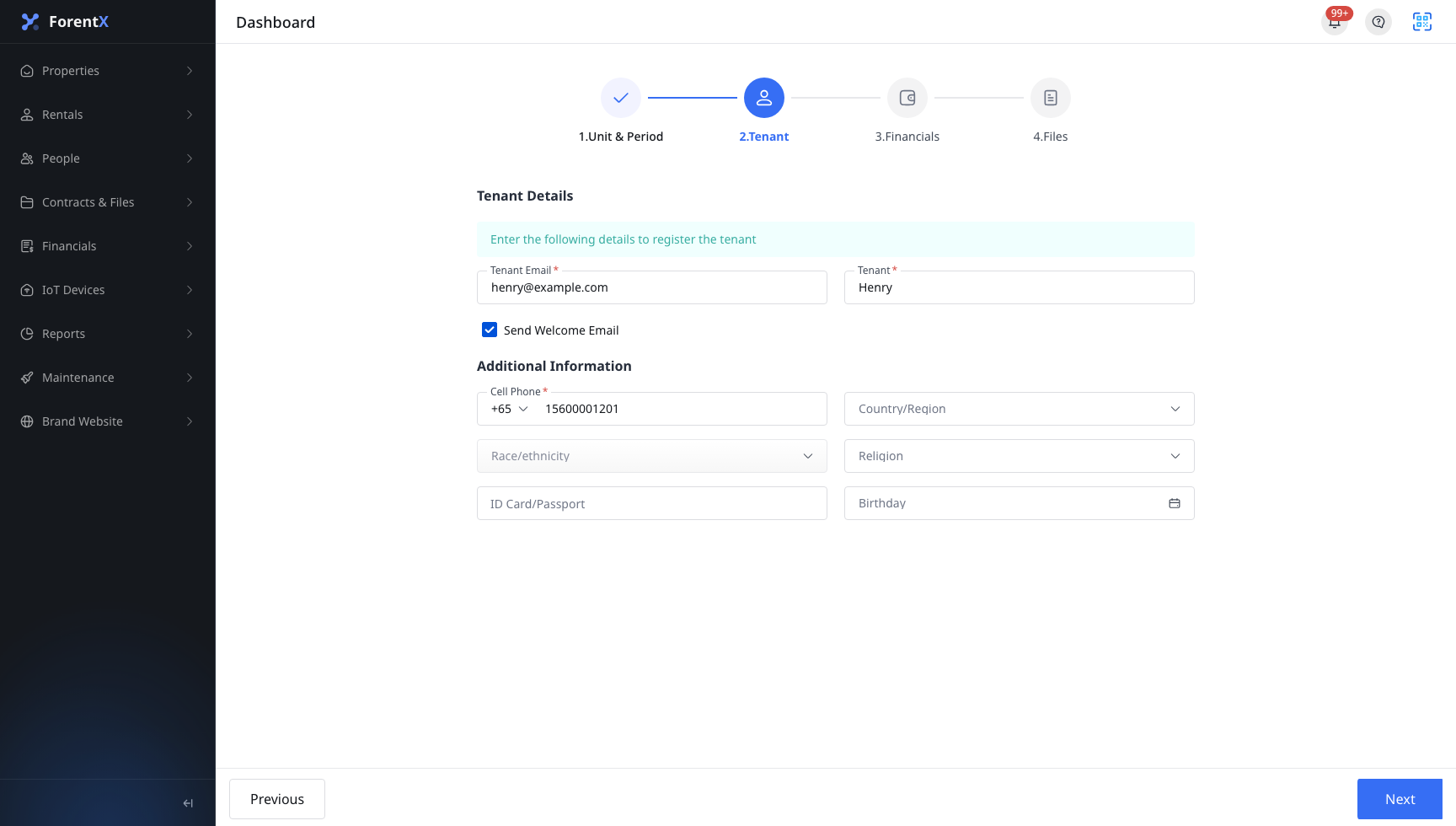
When it is turned on:
- The reservation can still be created normally
- For a brand-new tenant email, the system sends the welcome email after the reservation is created
- The tenant uses that email to set a password and activate the tenant portal
- In [People] -> [Tenants], the tenant portal status moves through [Invited] and then [Active] after activation
When it is turned off:
- The reservation can still be created normally
- The reservation flow does not send the welcome email
- In [People] -> [Tenants], the tenant stays at [Not Invited] until the invitation is sent later
If the email already belongs to an existing tenant, the current flow reuses that tenant profile instead of creating a duplicate one.
App
On the [Tenant] step, [Send Welcome Email] is also selected by default. The help bubble says enabling it lets tenants receive the welcome email.

When it is turned on:
- The reservation can still be created normally
- For a brand-new tenant email, the system sends the welcome email after the reservation is created
- The tenant can activate the portal account from that email
- In the tenant list on App, the status changes from [Invited] to [Active] after activation
When it is turned off:
- The reservation can still be created normally
- The reservation flow does not send the welcome email
- The tenant stays at [Not Invited] in the tenant list until invited later
Platform differences
| Topic | Web | App |
|---|---|---|
| Switch style | Checkbox on the [Tenant] step with tooltip | Icon checkbox on the [Tenant] step with help bubble |
| Where to track the result | [People] -> [Tenants] | Tenant list on App |
| Status values | [Not Invited], [Invited], [Active] | [Not Invited], [Invited], [Active] |
Note:
- This switch controls the welcome email, not whether the reservation can be created.
- [Invited] means the welcome email was sent but the tenant has not activated the portal yet.
- [Active] means the tenant completed password setup from the welcome email.