How do I handle outstanding bills and deposits during a landlord's Check-out?
After a landlord tenancy is ended, use [Ended Tenancy Details] to review what still needs to be settled with the landlord and what deposit balance still needs to be collected back.
Entry:
- Web: [Rentals] -> [Landlord Tenancies] -> open an ended landlord tenancy -> [Ended Tenancy Details]
- App: [Rentals] -> [Landlord Tenancies] -> open an ended landlord tenancy -> [Ended Tenancy Details]
Web
Step 1
Open the ended landlord tenancy and go to [Ended Tenancy Details].
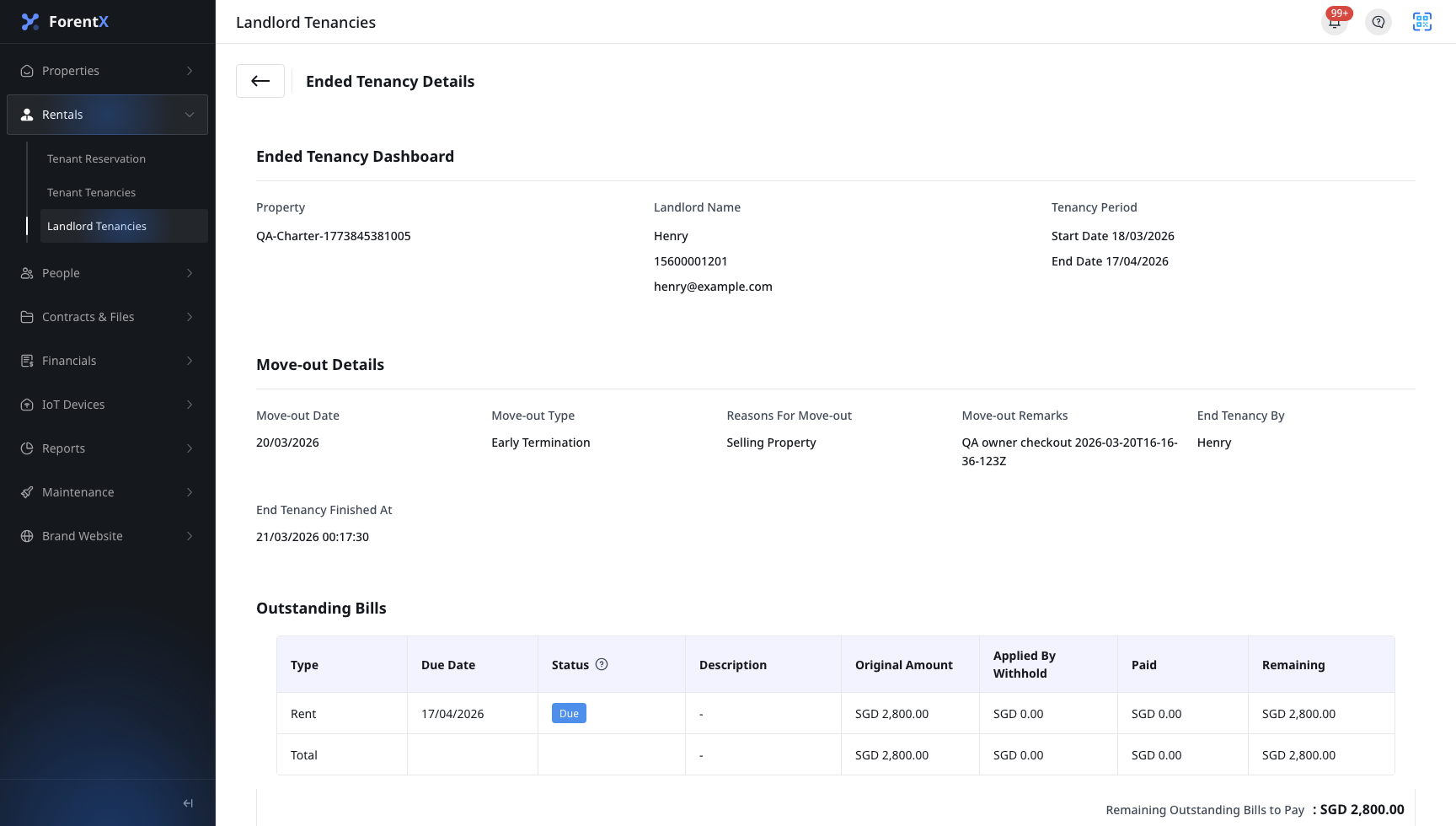
- The current Web page groups the settlement result into [Outstanding Bills] and [Deposits Held].
- [Remaining Outstanding Bills to Pay] shows the amount that still needs to be settled with the landlord.
- [Remaining Paid Deposit to Collect] shows the deposit amount that still needs to be collected back from the landlord.
Step 2
Review the bill and deposit records on the same page.
- In [Outstanding Bills], review the bill title, due date, status, original amount, settled amount, and remaining amount.
- In [Deposits Held], review the deposit title, due date, status, original amount, refunded amount, and remaining amount.
- Use this page as the current source of truth after the landlord check-out is completed.
App
Step 1
Open [Landlord Details] for an ended landlord tenancy, then switch to [Ended Tenancy Details].
- The App keeps [Ended Tenancy Overview], [Check Out Details], [Outstanding Bills], and [Deposits Held] in the same tab.
- The summary bars show the remaining outstanding amount and the remaining paid deposit to collect.

Step 2
Expand a bill or deposit card when you need the breakdown.
- Each card shows the original amount and remaining amount first.
- Expanding the card shows the withheld or refunded amount, due date, and description.
- This is the fastest way to confirm which record is still open before you finish the settlement.
Platform differences
| Topic | Web | App |
|---|---|---|
| Entry | Open an ended landlord tenancy and click [Ended Tenancy Details] from the detail flow | Open an ended landlord tenancy and switch to the [Ended Tenancy Details] tab |
| Settlement layout | Dedicated detail page with section tables | Settlement tab inside [Landlord Details] with expandable cards |
| Financial scope | [Outstanding Bills] and [Deposits Held] | [Outstanding Bills] and [Deposits Held] |
Note:
- Review [Outstanding Bills] and [Deposits Held] together because they describe the same ended tenancy settlement result.
- This article is for reviewing the recorded result after check-out is completed, not for starting the landlord check-out flow itself.