How do I handle billing settlement (deposit deduction, refund, etc.) during a tenant's check-out?
Use [Billing Settlement] on Web during [End Tenancy] to settle the tenancy's final meter items, outstanding charges, and deposit follow-up before you finish the move-out.
Entry:
- Web: [Rentals] -> [Tenant Tenancies] -> open the tenancy -> [Move-out Notice] -> [Move-out]
- App: The current App does not provide the [Billing Settlement] stage for tenant check-out.
Web
Step 1 Open the tenancy, complete the required [Move-out Details], then select [Next step] to enter [Billing Settlement].
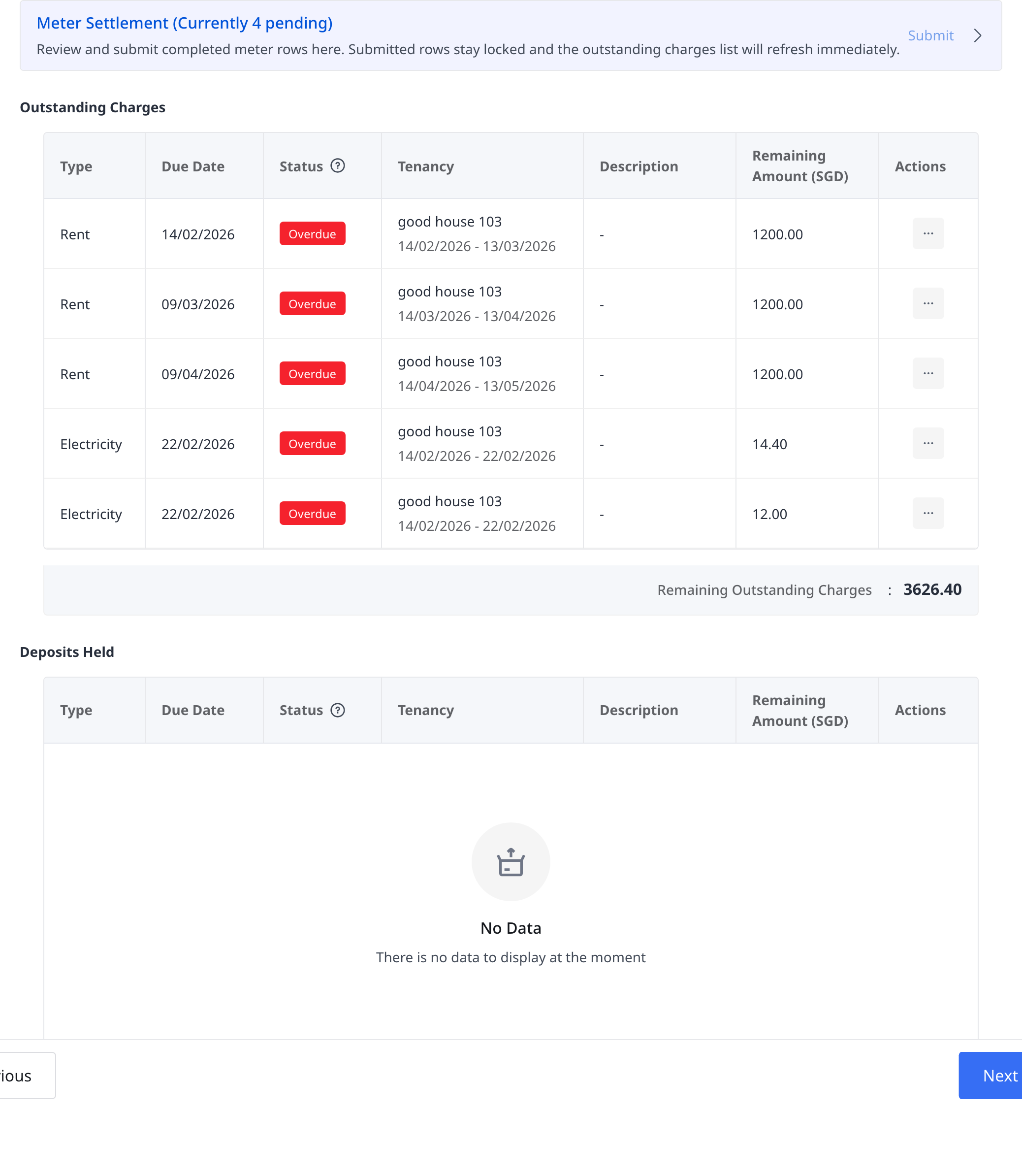
Step 2 Review the settlement blocks shown for the current tenancy:
- [Meter Settlement]
- [Outstanding Charges]
- [Deposits Held]
Step 3 Handle each section as needed:
- In [Meter Settlement], complete and submit any pending meter rows.
- In [Outstanding Charges], use [Receive Payment and Apply] when you need to record a payment against an unpaid charge.
- In [Deposits Held], use [Withhold Deposit] to offset unpaid charges, or [Refund Deposit] when a refundable deposit balance remains.
Step 4 After the current tenancy no longer has pending meter rows, select [Next step] to continue to [Confirm End Tenancy] and review any remaining collection or refund follow-up before you finish the move-out.
App
The current App does not provide a [Billing Settlement] page for tenant check-out. The current App check-out flow goes from notice or confirmation details directly to check-out confirmation, without the Web settlement blocks for meter settlement, outstanding charges, or deposit handling.
Platform differences
- Web supports the full [Billing Settlement] workflow for [Meter Settlement], [Outstanding Charges], and [Deposits Held].
- App currently does not provide the matching settlement stage for deposit deduction, refund, or outstanding charge collection during tenant check-out.
Note:
- [Meter Settlement] can show a pending count. Completed meter rows must be submitted before you can move to the next step.
- [Deposits Held] can show [No Data] when the current tenancy has no refundable deposit balance.
- The final confirmation step can still show remaining outstanding charges or remaining deposit to refund, so you can decide whether more follow-up is needed after the move-out is submitted.