How to understand the status of a landlord tenancy?
Use [Rentals] -> [Landlord Tenancies] to understand what each landlord tenancy [Status], [Detailed Status], and [To-dos] means on Web and App.
Entry:
- Web: [Rentals] -> [Landlord Tenancies]
- App: [Rentals] -> [Landlord Tenancies]
Web
Step 1 Open [Landlord Tenancies]. Review the [Status], [Detailed Status], and [To-dos] columns in the list.
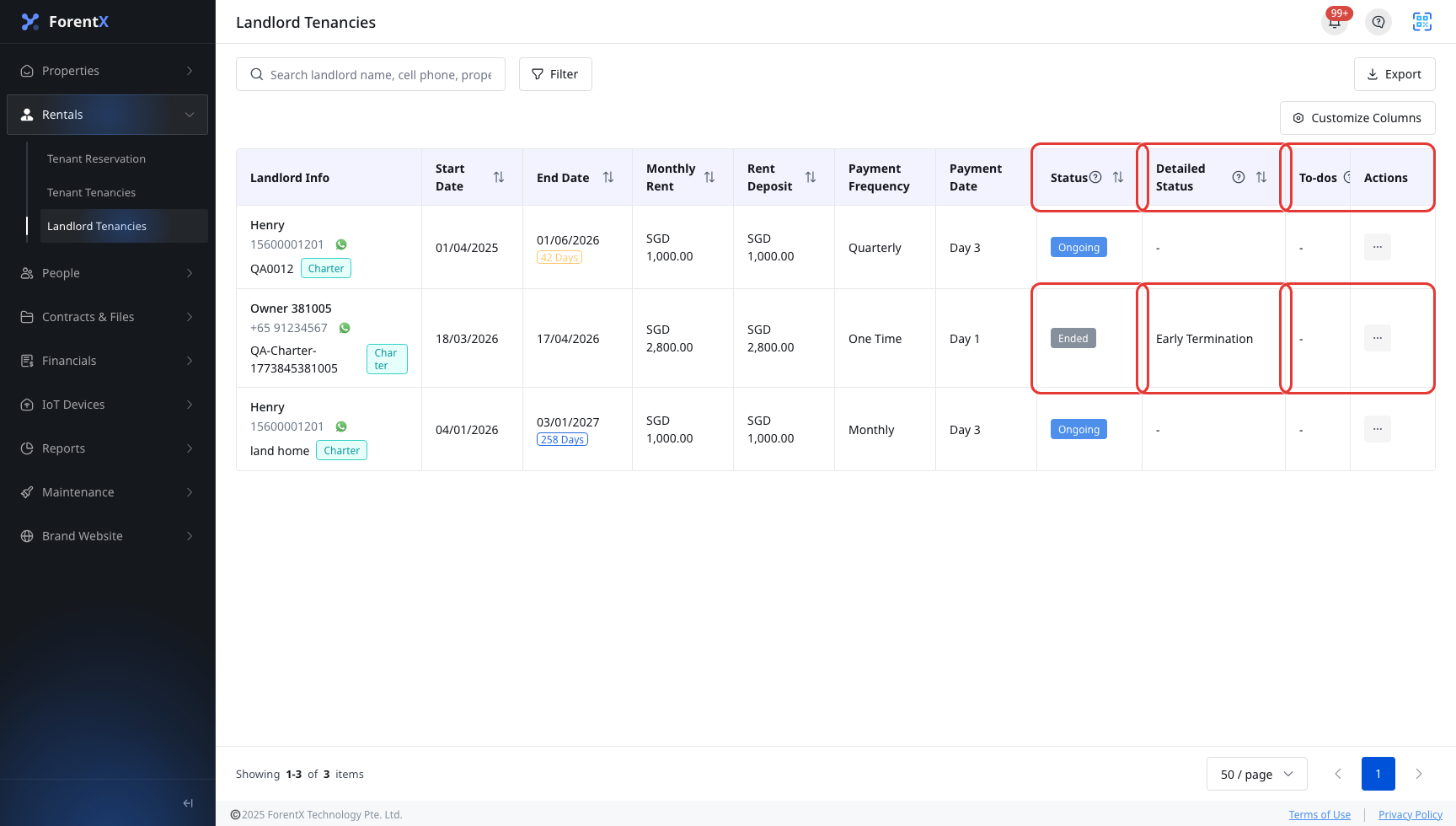
Step 2 Open any landlord tenancy record when you need to confirm the same fields again in the detail overview.
Use these meanings when you read landlord tenancy statuses on Web and App.
Status
- [Pending Start]: The landlord tenancy is confirmed, but the start date has not arrived yet.
- [Ongoing]: The landlord tenancy is active and the current management obligations are still in effect.
- [Expired]: The end date has passed, but the tenancy has not been formally ended yet.
- [Ended]: The landlord tenancy has already gone through the final ending process and is closed.
Detailed Status
- [Near Expiry Date]: The landlord tenancy is close to its end date and still needs a renewal or ending decision.
- [Renewed]: A future landlord tenancy has already been created for the next term.
- [Notified: Move-out On Schedule]: A termination notice was issued and the tenancy is planned to end on schedule.
- [Notified: Early Termination]: A termination notice was issued and the tenancy is planned to end early.
- [Notified: Late Move-Out]: A termination notice was issued and the tenancy is planned to end late.
- [Checked Out On Schedule]: The ending process is complete and it was recorded as an on-schedule check-out.
- [Early Termination]: The ending process is complete and it was recorded as an early termination.
- [Late Move-Out]: The ending process is complete and it was recorded as a late move-out.
- [Voided]: A pending renewal was canceled and the future landlord tenancy record is no longer valid.
To-dos
- [Prepare Renewal/Ending]: Contact the landlord and decide whether to renew or end the tenancy.
- [Move-out On Schedule]: A termination notice already exists, and the next step is to finish the on-schedule ending process.
- [Early Termination]: A move-out notice already exists, and the next step is to finish the early termination flow.
- [Late Move-Out]: A move-out notice already exists, and the next step is to finish the late move-out flow.
App
Step 1 Open [Rentals], then switch to [Landlord Tenancies]. Each card shows the current [Detailed Status] first and the main [Status] tag beside it. If the record has a current to-do, it appears on a separate line below the status tags.

Step 2 Tap [Filter] if you want to narrow the list by [Status], [Detailed Status], or [To-dos].

Step 3 Tap any landlord tenancy card to open [Landlord Details]. In the [Overview] tab, the same [Status], [Detailed Status], and [To-dos] fields are shown for that record.
Platform differences
| Topic | Web | App |
|---|---|---|
| Where you check statuses | Separate [Status], [Detailed Status], and [To-dos] columns in the [Landlord Tenancies] table | Statuses are shown on each landlord tenancy card, in [Filter], and again in [Landlord Details] -> [Overview] |
| List layout | Table list with columns | Card list with status tags and a separate filter page |
| English wording | Uses [Move-out On Schedule] in the landlord tenancy status wording | The filter and to-do wording uses [Check Out On Schedule] for the same on-schedule ending meaning |
| Extra actions around the list | Supports [Export] and [Customize Columns] in the same page | Focuses on card browsing, filtering, and detail view |
Note:
- When there is no current [Detailed Status] or [To-dos] value, the UI can show
-or leave the to-do line empty. - [To-dos] can include a target date. If the required action date has already passed, the list can also show an overdue hint.
- In both Web and App filters, the available [Detailed Status] options change according to the [Status] values you select.